Welcome to NeuroCraft: Comprehensive Server Documentation

Welcome to the official NeuroCraft documentation! NeuroCraft is a feature-rich, Vanilla plus (vanilla +) survival server designed to offer a balanced mix of classic gameplay, advanced quality-of-life enhancements, and a vibrant community economy.

NeuroCraft is a Minecraft Java Edition server. We always strive to run the latest version of Minecraft, but thanks to our robust backend, you can connect using any Minecraft Java version from 1.9 or above!

This guide covers everything you need to know to get started, protect your builds, make money, and stand out!

Interactive Live Map: Track your journeys, view land claims, and explore the world in real-time. Open Map →

Getting Started: The Basics

NeuroCraft provides a suite of essential commands to help you navigate the world and manage your gameplay.

Essential Commands

  • /help - View a list of all commands available to your rank.
  • /warp spawn - Return to the main server spawn.
  • Random Teleport - To start your adventure, walk into the "Spawn Somewhere Random..." hologram/sign at spawn to be teleported to a random location in the wilderness!
  • /sethome <name> - Set a personal home at your current location.
  • /home <name> - Teleport to your specified home.
  • /delhome <name> - Delete a specified home.
  • /renamehome <oldname> <newname> - Rename one of your existing homes.
  • /back - Teleport back to your previous location (e.g., before your last teleport).
  • /tpa <player> - Request to teleport to another player.
  • /warp - Teleport to primary server locations.
  • /warps - List all available server warps.

Rules & Fair Play

Our community thrives on respect. Our primary rules are:

  1. Respect all players and staff.
  2. No hacking, cheating, or exploiting. (We utilize a powerful, active anti-cheat system. Cheating = Ban).
  3. No griefing.
  4. Keep chat respectful and appropriate (supported by our automated chat filters).
  5. Do not spam or advertise.
  6. PvP is enabled, but this is NOT a PvP server. You may defend yourself, but actively hunting or repeatedly killing other players is strictly prohibited and will result in moderation action.
Economy & Trading

NeuroCraft features a bustling player-driven economy. You can earn money by selling items, trading with others, or utilizing the Auction House.

Managing Your Balance

  • /bal or /balance - Check your current account balance.
  • /baltop - View the wealthiest players on the server leaderboard.
  • /pay <player> <amount> - Send money to another player.
  • /sell - Sell items from your inventory to the server to earn money.

The Auction House

Our dynamic Auction House lets you buy and sell items directly with other players from anywhere in the world!

  • /ah or /pauction - Open the main Auction House menu.
  • /ah sell <price> [amount] - List the item in your hand on the Auction House for a specific price.
  • /ah bid <price> [amount] - Place an item up for bidding, starting at the price you set.

Tip: You can purchase items outright or participate in bidding wars! Expired or unsold items can be safely collected from your Auction House profile.

Land Claiming & Protection

Your builds are your own! NeuroCraft places the responsibility of protecting land in the hands of the players. You are responsible for not claiming your land.

Grief Prevention

By claiming your land, you protect it from griefers, unauthorized access, and theft. Once claimed, other players cannot build, break, or open chests within your borders unless you explicitly trust them.

How to Claim Land:

  1. Take a Golden Shovel in your hand.
  2. Right-click one corner block of the area you want to protect.
  3. Right-click the opposite diagonal corner block. This creates a protected rectangular region using your available claim blocks!

How to Resize a Claim:

  1. Equip your Golden Shovel while standing within your existing claim.
  2. Find one of the Glowstone blocks marking the corners of your claim.
  3. Right-click the Glowstone corner, then click a new block to alter the claim's size.

Claim Flying

Building massive structures is much easier when you can fly!

  • /fly - If you are standing inside your own claim, you can toggle flight mode for free!

Quality of Life & Utilities

We've added several mechanics to remove the tedious parts of survival gameplay so you can focus on having fun.

Portable Backpacks

Need more inventory space? You can access virtual backpacks to store your loot on the go!

  • /backpack - Open your virtual storage.
  • Backpack sizes are based on your server rank (e.g., Support Rank: 1x9 slots, Honourable Rank: 2x9 slots, Philanthropist Rank: 3x9 slots).

Auto Chest Sorting

Tired of messy storage rooms? You can automatically sort your chests, barrels, and inventory.

  • /chestsort - Toggle automatic inventory and chest sorting on or off.

Custom Daytime

Enjoy the sunshine! To give builders and explorers more time to enjoy the overworld safely, our daytime cycle is 2.5x longer than a standard vanilla Minecraft day.

Skip the Night

Don't want to deal with monsters? Experience perpetual daylight by voting!

  • /skipnight - Initiate a server-wide vote to skip the nighttime. If enough players agree, the sun will rise immediately.

Advanced Villager Control

Trading halls have never been easier to manage.

  • Claiming: Shift + Right-Click a villager to claim them as your own.
  • Protection: Claiming prevents other players from tampering with or killing your villagers.
  • Customization: Alter their properties, change their biomes, and even craft specialized "Villager Hoppers" for automated storage solutions.

Advanced Mechanics & Custom Items

Extractable Enchantments

Found an amazing enchantment on a terrible piece of gear? You can extract it!

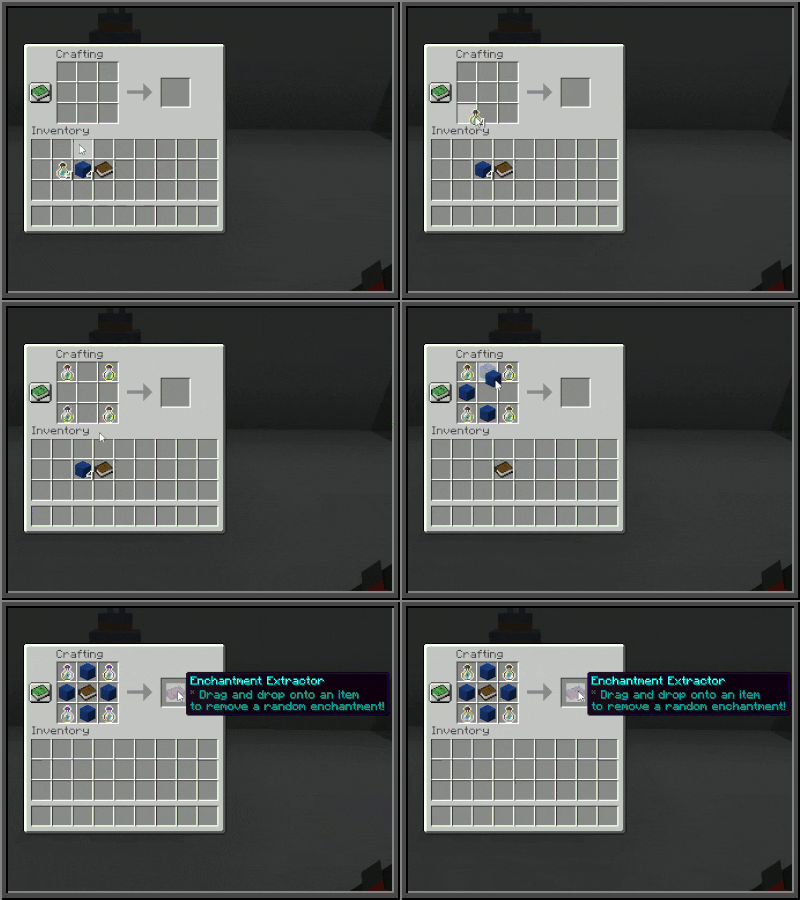
  • Enchantment Extractors: Special items that allow you to pull random enchantments off gear and turn them into Enchanted Books.
  • Dust of Chance: Apply this dust to your extractors to increase the success rate of the extraction process! (Drag and drop the dust onto an extractor).

Crafting the Extractor

Rotten Flesh to Leather

Zombies just got a lot more useful! If you have excess rotten flesh, simply place it inside a Furnace (or Smoker). Smelting 1 Rotten Flesh will yield 1 Leather.

Silk Spawners

Gather monster spawners with ease!

  • Using a pickaxe enchanted with Silk Touch, you can break any monster spawner and pick it up intact.
  • Placing the spawner back down will retain the exact mob type it originally spawned!

Trophy Mob Heads

Show off your hunting prowess! Defeating various mobs (and even players) gives you a chance to obtain their heads as unique trophies to decorate your base.

Social & Teams

Teams & Guilds

Don't survive alone! Form teams with your friends, create an alliance, and rise to the top.

  • /team - View all team-related commands. You can create a team, invite friends, promote members, and level up your team's rank to unlock new perks.

Security & Performance Optimizations

NeuroCraft is built from the ground up to provide a smooth, fair, and secure experience for all players.

Multi-Layered Anti-Cheat & Anti-Xray

We take fair play seriously. The server is heavily secured against all modern cheats and exploits. This includes a state-of-the-art, multi-layered Anti-Xray system that actively obfuscates ores to ensure that the mining economy remains balanced and fair for legitimate players.

Deep Optimizations

We have implemented massive optimizations at every level of our infrastructure to ensure a lag-free experience:

  • Networking Stack: Secured and optimized packet handling to prevent attacks and reduce latency.
  • Minecraft Server: Heavily tuned server configurations and dedicated performance plugins to maintain a high TPS (Ticks Per Second) even with many players online.
  • Server Hardware: Running on dedicated, high-performance computing hardware designed specifically for heavy workloads.

Paid Ranks & Store

Want to support the server and unlock even more Quality of Life (QoL) improvements? We offer three premium ranks that provide exclusive perks, larger backpacks, and chat prefixes to help you stand out!

You can view the full list of perks and purchase ranks at: https://store.neuronexus.xyz/shop/

  • Supporter Rank
  • Honourable Rank
  • Philanthropist Rank

Connect With Us

  • Custom Spawn: Our beautiful, custom-built spawn world was created exclusively for NeuroCraft by g00ie!
  • Discord: Join our community, get support, and chat with friends at dsc.gg/neuronexus
  • Web Store: Want to support the server and unlock ranks, larger backpacks, and other perks? Visit our store at store.neuronexus.xyz!

Welcome to your new home. We hope you enjoy your stay on NeuroCraft!